How Do I Recover a Lost Cryptocurrency Wallet?

Recover lost cryptocurrency wallet. Learn seed phrase recovery, private key restoration, custodial exchange recovery, and professional services.
Cryptocurrency wallet recovery in 2025 depends entirely on whether you retained backup information before losing access. With a seed phrase (12-24 words) or private keys, recovery is straightforward—wallet ownership is cryptographically tied to these credentials, not stored on servers. Without backups, recovery becomes extremely difficult or impossible for non-custodial wallets. This comprehensive guide provides systematic recovery methods for different wallet types: software wallets (MetaMask, Trust Wallet), hardware wallets (Ledger, Trezor), custodial exchanges, and professional recovery services. The guide includes prevention strategies, recovery sequences, and India-specific considerations for cryptocurrency security.
Understanding Cryptocurrency Wallet Ownership and Recovery
Unlike traditional bank accounts where companies maintain customer records enabling password resets, cryptocurrency wallets operate on decentralization principles. Wallet ownership is proved through cryptography, not company databases. This creates both opportunity and risk: users retain complete control without intermediaries, but also bear complete responsibility for backup management.
Critical Principle: Wallet companies (Ledger, MetaMask, Trezor, Trust Wallet) do NOT store your private keys, seed phrases, or passwords. They cannot recover these for you. Only you can perform recovery, using backup information you should have created when originally setting up the wallet.
Two Wallet Types with Different Recovery Implications:
Non-Custodial Wallets (Self-Custody): MetaMask, Trust Wallet, Ledger, Trezor, Exodus. You control all keys. No company can access funds or assist recovery. Loss of backups = permanent loss of access.
Custodial Wallets (Exchange): Coinbase, Kraken, Binance. The exchange controls keys. Standard password resets and identity verification enable account recovery.
Recovery Method 1: Using a Seed Phrase (Most Common)
What Is a Seed Phrase?
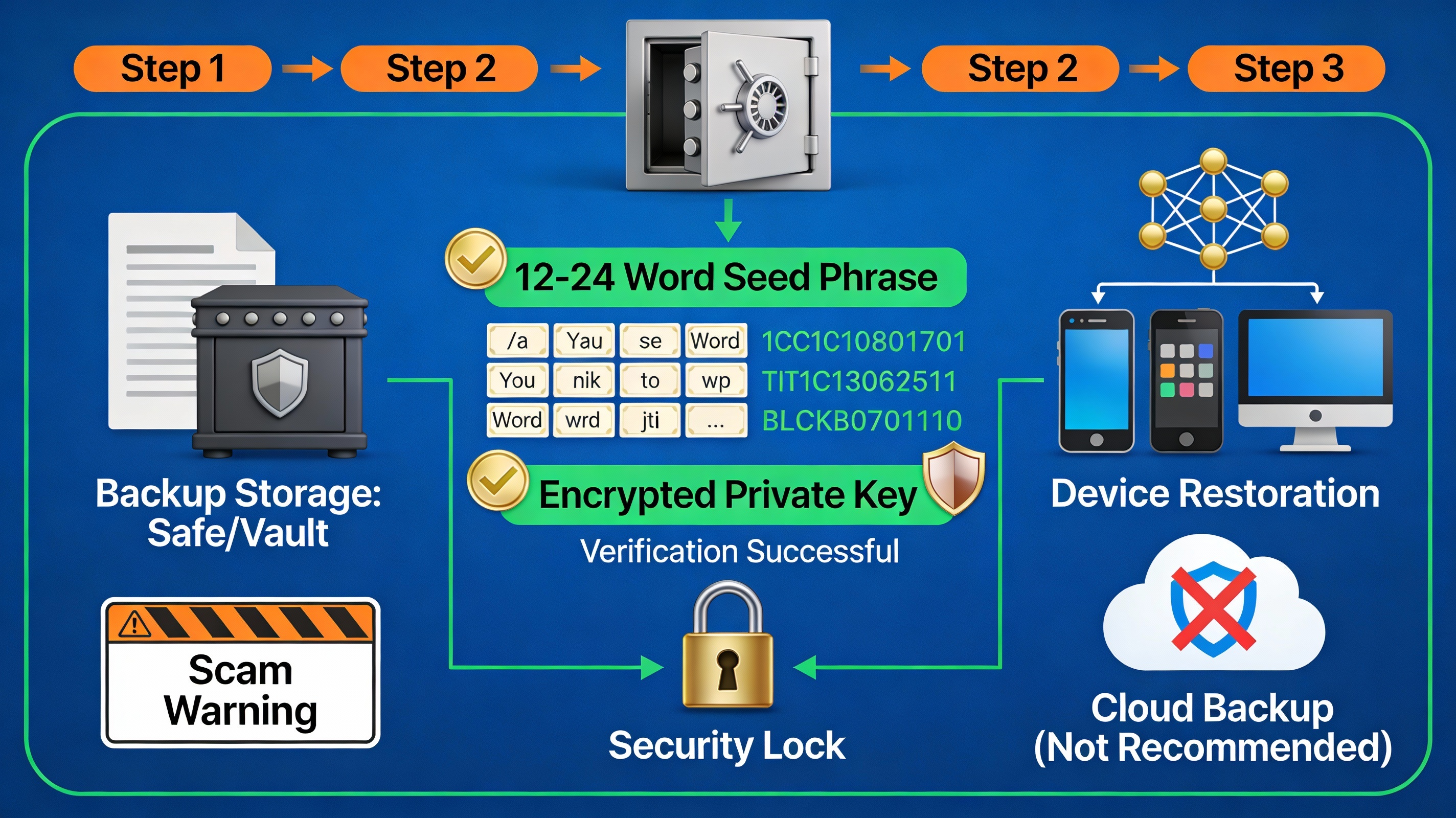
A seed phrase (also called recovery phrase, recovery seed, or mnemonic) is typically 12 or 24 random words generated when you create a non-custodial wallet. This phrase can mathematically derive every private key and account in your wallet. Critically, the wallet software is just an interface—ownership is tied to the seed phrase itself, not any particular wallet app.
Important: If you only have your seed phrase but not the wallet password, recovery is still fully possible. You'll simply create a new password during restoration.
Step-by-Step Recovery with Seed Phrase
Step 1: Gather Your Backup
- Locate your written seed phrase (paper, metal backup, secure storage)
- Verify all 12 or 24 words are legible
- Ensure words are in exact correct order (order matters critically)
Step 2: Choose Wallet Software
- Download the official wallet application from verified sources (official website or app store)
- NEVER download from third-party sources or links in emails/messages
- For hardware wallets: use official Ledger/Trezor software
Step 3: Select "Restore" or "Import Wallet"
- Launch the wallet application
- When prompted "Create New Wallet or Restore Existing?", choose restore option
- Some wallets say "Import Wallet," others say "I Already Have a Seed Phrase"
Step 4: Enter Seed Phrase Carefully
- Enter each word in exact order shown in your backup
- One typo or word transposition = wallet won't restore
- Some wallets: click each word; others: type words separated by spaces
- Many wallets display a dropdown suggesting words as you type (use it to avoid typos)
Step 5: Create New Password
- This password is NEW—different from any original password
- This password is device-specific (only for that device)
- It's NOT your seed phrase and won't restore wallet elsewhere
- Write down this new password and store securely
Step 6: Wait for Synchronization
- Wallet scans blockchain to find transactions and assets
- Time varies: few minutes to hours depending on:
- Number of accounts/addresses created
- Cryptocurrency age (older = more blockchain to scan)
- Device performance
- Network conditions
- Don't close the app during synchronization
Step 7: Verify Recovery
- Balance appears showing your cryptocurrency
- All transactions display in wallet history
- Addresses match your records (if you saved screenshots)
Recovery Complete: You've regained full access. Move your crypto to new addresses for security (especially if device was compromised).
Recovery Method 2: Using Private Keys
When to Use Private Keys
Use private keys when you DON'T have your seed phrase but DO have individual private keys. Private key recovery restores a SINGLE address, not your entire wallet (unlike seed phrase which restores all addresses).
Private Key Format: Long alphanumeric string (example: 5KN7MzqK5wt2TP1fQCYyHBtDrXdJuXbUzm4A9rKAteYV3Qi5CVR for Bitcoin)
Importing Private Key to Restore Access
Step 1: Choose Compatible Wallet
- Different wallet types support different private key formats
- Bitcoin wallets need Bitcoin private keys
- Ethereum wallets need Ethereum private keys
- Some software wallets: MetaMask, Trust Wallet, Exodus support multiple formats
Step 2: Locate Import Option
- Some wallets: Settings → Import/Export
- Others: Start screen → Import existing wallet → Choose "Private Key"
- Hardware wallets: Generally don't import private keys directly (too dangerous)
Step 3: Enter Private Key
- Copy-paste your private key (don't type manually—error risk too high)
- Keep private key secure during import
- Some wallets delete import history; verify app's security
- NEVER upload private key to cloud or email
Step 4: Restore and Verify
- Wallet imports the key
- Private key generates the corresponding address
- Your balance displays (or zero if funds moved)
Important Limitation: Private keys only restore individual addresses. If your wallet had multiple addresses, you must import each private key separately. Using a seed phrase is more efficient.
Recovery Method 3: Custodial Exchange Account Recovery
For Coinbase, Kraken, Binance, and Similar Exchanges
Custodial exchanges (where the company holds your keys) enable account recovery through standard password reset processes.
Step 1: Navigate to Login Page
- Go to exchange website (Coinbase.com, Kraken.com, Binance.com)
- Click "Forgot Password?" or "Login Issues"
Step 2: Verify Email/Identity
- Enter registered email address
- Exchange sends password reset link to email
- Click link (valid for limited time, usually 24 hours)
- Create new password
Step 3: Complete Identity Verification (KYC)
- If significant time since last login, exchanges may require re-verification
- Upload government ID
- Complete facial verification or additional security questions
- Process takes minutes to 24 hours
Step 4: Recover Two-Factor Authentication (2FA)
- If 2FA enabled: have authenticator app? Use backup codes?
- Lost 2FA device/codes? Contact exchange support for recovery
- Exchanges ask security questions or require identity verification
- Recovery typically takes days to weeks
Step 5: Restore Account Access
- Once verification complete, full account access restored
- Funds remain secure (exchange held the keys)
- 2FA should be re-enabled immediately on new device
Easier for exchanges than non-custodial wallets—company maintains backup systems.
Recovery Method 4: Hardware Wallet Recovery
Ledger, Trezor, SafePal, and Similar Devices
Hardware wallets are specialized secure devices generating and storing private keys offline. Recovery follows similar seed phrase process with device-specific steps.
Step 1: Acquire Replacement Device (if original lost/damaged)
- Buy new Ledger, Trezor, or same model
- Physical device hardware doesn't matter—your seed phrase works on ANY compatible device
- Assets exist on blockchain, not on device (device is just a key manager)
Step 2: Initialize New Device
- Power on device
- Select language and PIN preferences
- Device prompts: "Create new wallet" or "Restore from backup"
- Choose "Restore from recovery phrase"
Step 3: Enter Recovery Phrase
- Device asks: 12-word or 24-word phrase?
- Select correct length
- Using device buttons, enter each word
- Device narrows options as you type (easier than typing)
- Double-check word order carefully
Step 4: Confirm PIN Code
- Create new 4-8 digit PIN (device-specific)
- This PIN protects device from physical theft
- Losing PIN forces factory reset (requires seed phrase again)
Step 5: Verify Account Restoration
- Connect device to computer/phone
- Official wallet software (Ledger Live, Trezor Suite) recognizes device
- All accounts and balances appear
- Addresses match original holdings
Key Point: Even if someone steals your hardware wallet, WITHOUT your PIN and seed phrase, they cannot access your cryptocurrency. For extra security, transfer funds to newly created addresses after recovery.
Recovery Method 5: Professional Crypto Recovery Services
When DIY Recovery Fails
Professional recovery services help when:
- You have no seed phrase but had the device
- Device is corrupted but data might be recoverable
- Password forgotten and funds locked
- Scammed and stolen funds need tracing
Services Available (2025):
- ReWallet, Data Recovery, Professional Crypto Recovery, Keychain: Specialize in password brute-forcing, hardware wallet recovery, accessing corrupted wallet files
- CipherTrace, Chainalysis, Elliptic: Blockchain forensics tracing stolen funds across exchanges and wallets
- Ledger Recovery Service: Official Ledger service for users without backup access (premium service, identity verification required)
How Professional Recovery Works:
- Password Brute-Force: Services use specialized computers generating thousands of password combinations per second, trying to crack wallet passwords
- Hardware Recovery: Recover data from damaged or corrupted storage devices containing wallet files
- Forensic Analysis: Analyze blockchain transactions to track stolen funds and identify recipient addresses
- Legal Recovery: Coordinate with exchanges and law enforcement to freeze/recover funds
Cost Model:
- Success-based fees: Pay only if recovery succeeds
- Typical range: 10-30% of recovered amount
- Some offer flat fees or retainer models
- Always get written agreement specifying success criteria
Important: Professional recovery services legitimately help, but many scams exist. Warning signs:
- Guaranteed recovery promises
- Upfront payment before recovery
- Cold outreach offering recovery services
- Requests for private keys or seed phrases (legitimate services NEVER request these)
- Poor website quality or unprofessional communication
Prevention: Critical Backup Strategies
Recovery becomes unnecessary with proper prevention. Implement these strategies BEFORE needing recovery.
Seed Phrase Backup Best Practices
Physical Storage (Highly Recommended):
- Write seed phrase on paper with permanent ink
- Store multiple copies in geographically separate locations:
- Home safe deposit box
- Bank safety deposit box (different city)
- Parent/trusted friend's safe location
- Use durable backup products (metal plates, BILLFODL, Cryptosteel) surviving fire/water
Splitting Strategy:
- Store words 1-8 in location A
- Store words 9-16 in location B
- Store words 17-24 in location C
- No single person can reconstruct complete phrase
- Increases security dramatically (requires multiple break-ins)
Never Store Digitally:
- ❌ Screenshots of seed phrase
- ❌ Photos of seed phrase
- ❌ Cloud storage (Google Drive, Dropbox, iCloud)
- ❌ Email drafts
- ❌ Password managers (unless hardware-disconnected encrypted backups)
- ❌ Notes apps or documents
Digital storage risks hacking—if attacker gains device access, seed phrase is compromised.
Password Backup Strategy
- Store wallet passwords in encrypted password manager (Bitwarden, 1Password)
- Use strong, unique passwords (20+ characters with mixed case, numbers, symbols)
- NEVER store passwords and seed phrases together
- Never reuse passwords across wallets or accounts
Testing Recovery Before Crisis
- Create test wallet with small amount
- Test complete recovery process on secondary device
- Verify seed phrase actually works
- Identifies problems while stakes are low
- Builds confidence for emergency recovery
India-Specific Wallet Recovery Considerations
Regulatory Environment:
- RBI discourages but hasn't banned cryptocurrency
- Tax implications on recovered/restored assets
- Keep detailed records of recovery date and amount recovered
Exchange Access:
- Use regulated Indian exchanges (Kraken India, CoinDCX, Zebpay) for custodial wallet recovery
- Unregulated P2P platforms complicate recovery
- Custodial accounts easier to recover than non-custodial
Data Storage in India:
- Store seed phrase backups physically in India to avoid legal complications
- Understand RBI regulations on cryptocurrency storage
- Some Indian banks restrict safe deposit boxes for crypto materials
Professional Recovery Services:
- Verify professional recovery service legitimacy before engagement
- Check for registered company and legal agreements
- Success-based fees more common than upfront payments
- Ensure services comply with India's PMLA regulations
Common Recovery Mistakes to Avoid
Mistake 1: Sharing Seed Phrase with "Recovery Services"
Legitimate recovery services NEVER request seed phrases. If someone asks, it's a scam.
Mistake 2: Typos During Seed Phrase Entry
Single word misspelled = wrong wallet generates. Take time, verify each word.
Mistake 3: Using Wrong Wallet Software
Recovery phrases are blockchain-specific. Bitcoin seed phrases work with Bitcoin wallets, not Ethereum wallets. Match wallet to your original asset.
Mistake 4: Connecting to Insecure Networks
Restore wallets on secure, malware-free devices. Public WiFi creates interception risks.
Mistake 5: Panic-Driven Decisions
Stay calm. Take time to verify you're using official software. Rushed decisions lead to entering credentials into phishing sites or scams.
Mistake 6: Losing Recovery Documentation Again
After successful recovery, immediately create new backups of seed phrase and updated passwords.
Recovery Requires Preparation
Cryptocurrency wallet recovery in 2025 is straightforward IF you prepared properly through backups. With seed phrases or private keys, recovery takes minutes. Without backups, recovery becomes extremely difficult or impossible for non-custodial wallets.
The critical insight: Recovery is not primarily a technical problem—it's a backup management problem. Successful recovery depends entirely on whether you took backup creation seriously when originally setting up your wallet.
Best practice: Treat seed phrase backup creation as CRITICAL to wallet setup, not an optional afterthought. The few minutes spent writing down and securing your seed phrase in multiple locations could mean the difference between easy recovery and permanent loss of cryptocurrency.
For cryptocurrency holdings of meaningful value, implement proper backup strategies TODAY rather than hoping recovery services can help TOMORROW.
Comments 0
Most Read

What Is the Concept of Tokenization in Blockchain?

Bitcoin & Ethereum Market Momentum Update

Recommended Post
What Is the Concept of Tokenization in Blockchain?

How Do I Avoid Common Mistakes When Trading Cryptocurrencies?
How Do I Recover a Lost Cryptocurrency Wallet?

How Can I Learn More About Cryptocurrency and Blockchain Technology?

How Do I Track Cryptocurrency Prices in Real-Time?



Leave a Comment